Please do touch calibrate follow below steps:
1. Move your mouse cursor to the bottom left of the screen. Right mouse click the Windows icon, then left mouse click “Run”.

2. Key in or copy: shell:::{80F3F1D5-FECA-45F3-BC32-752C152E456E} and select "OK".
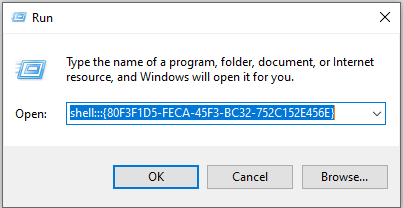
3. The Tablet PC Settings will show up as below. You can select TD monitor under Display options followed by clicking on “Calibrate”.
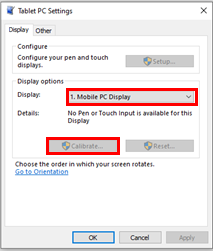
After the calibration process is done, the touch accuracy should improve.